

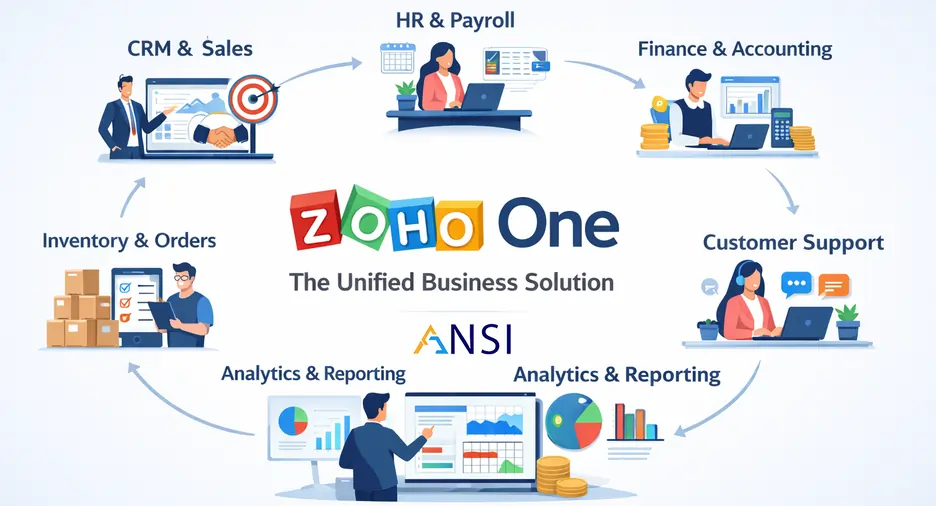
Zoho One Connected Operating Model for CRM, Finance, HR, Projects and Support
Zoho One can be powerful because it brings many business applications into one ecosystem. But the real value does not come from activating more apps. It comes from designing how sales, finance, projects, support, HR, automation and reporting should work together as one operating model.
Why Zoho One needs operating model design
Many companies start Zoho One by implementing the application that feels most urgent: CRM, Books, Projects, Desk or HRMS. That can work for a small first phase, but problems appear when each team configures its own app without a shared data model. Customer names may differ between sales and finance. Project delivery may not connect to invoicing. Support history may not be visible to account managers. HR approvals may stay separate from operational reporting.
A connected operating model solves this before the rollout grows too large. It defines which app owns which data, where handoffs happen, which automations are allowed and which dashboards leadership will use. ANSI Technologies supports this through Zoho One implementation services with practical planning, configuration, integration and improvement support.
The connected Zoho One map
Owns leads, accounts, opportunities, follow-up, quotes and sales pipeline visibility.
Controls invoicing, collections, expenses, finance visibility and statutory reporting inputs.
Tracks tasks, milestones, timesheets, project delivery and customer commitments.
Manages tickets, service SLAs, customer issues, support history and resolution quality.
Supports employee records, leave, attendance, approvals, documents and HR operations.
Connects approvals, alerts, task routing and cross-app updates when business rules are clear.
How to phase Zoho One without creating silos
A phased rollout does not mean each app is designed separately. It means the business agrees the bigger model, then implements in controlled stages. For many companies, the first phase should include CRM and finance visibility. The second phase may add project delivery, customer support or HRMS. The third phase may improve analytics, automation and advanced workflows.
| Phase | Primary objective | Design control |
|---|---|---|
| Phase 1 | Establish customer, sales and finance data discipline. | Connect Zoho CRM services with Zoho Books services only where the quote-to-invoice flow is clear. |
| Phase 2 | Bring delivery, service and HR into the same operating view. | Introduce Zoho Projects, Zoho Desk support or Zoho HRMS with defined handoffs. |
| Phase 3 | Improve automation, reporting and management dashboards. | Use Zoho automation services when workflows are stable and ownership is clear. |
Data rules that protect the full suite
The biggest risk in a multi-app suite is duplicated or inconsistent data. Zoho One should have clear rules for customer names, contact ownership, product lists, tax settings, employee records, project codes, support categories and approval authority. These rules are not administrative details; they decide whether reporting will be trusted.
- Define one source of truth for customer and contact records.
- Keep finance master data controlled and reviewed before go-live.
- Map project and support handoffs to real customer commitments.
- Use mandatory fields only where they protect decisions or process quality.
- Avoid automating unclear workflows.
- Review dashboards with process owners before publishing them to leadership.
Where customization should be controlled
Zoho One is flexible, but flexibility needs governance. Custom fields, custom modules, workflows, integrations and reports should be approved because they create long-term support responsibility. When a business needs deeper configuration, Zoho customization services can help extend the platform without damaging simplicity.
A good implementation partner should challenge unnecessary complexity, document the reason for each change and keep the first rollout focused enough for users to adopt. ANSI Technologies provides Zoho Solution Services for organizations that want connected rollout support rather than disconnected application setup.
What leadership should review every month
Once Zoho One is live, leadership should not only ask whether users are logging in. The better question is whether the connected operating model is improving the business. Are sales opportunities moving faster? Are invoices raised with fewer corrections? Are project commitments visible before deadlines are missed? Are support tickets being resolved within agreed service expectations? Are HR approvals and employee data easier to manage?
A monthly review should focus on a few operational indicators rather than a large dashboard pack. This helps leaders see where the system is working, where users need support and where the next improvement should be made.
Check whether account managers can see sales history, support history and open delivery commitments in one place.
Review whether quotes, invoices, collections and approvals are flowing with less manual reconciliation.
Confirm that project owners can track milestones, timesheets, blockers and customer commitments.
Check whether employee records, approvals and HR requests are easier for managers and staff to complete.
This monthly rhythm keeps Zoho One from becoming a set of tools that slowly drift apart. It encourages the business to improve the connected model with evidence, not assumptions.
Common Zoho One rollout mistakes to avoid
The most common mistake is trying to use too many apps in the first phase. A broad license does not mean every application should be launched together. The second mistake is allowing each department to configure its own process without a shared data model. The third mistake is automating before the process is stable. Automation should make a good workflow faster, not hide a broken workflow.
Another risk is reporting overload. Zoho One can produce many dashboards, but leadership needs a small number of trusted views. Start with the reports that drive weekly decisions, then expand only when the underlying data is reliable.
When to add analytics and advanced automation
Analytics and advanced automation should be added after core workflows are stable. If the underlying data is inconsistent, dashboards will create confusion. If approvals are unclear, automation will only move confusion faster. Build the foundation first, then improve intelligence and speed.
Ownership after implementation
Zoho One needs named owners after launch. Each process owner should review data quality, user feedback and improvement requests so the suite keeps improving with the business. This ownership prevents apps from drifting apart and keeps reporting trusted as the organization grows and ensures the platform stays useful for managers and users across every connected department.
Frequently asked questions
What is a Zoho One operating model?
A Zoho One operating model defines how CRM, finance, projects, HR, support, automation and reporting work together instead of being implemented as separate apps.
Should all Zoho One apps be launched at once?
Usually no. A phased rollout is safer because the business can stabilize core workflows before expanding to more departments and automations.
Which Zoho One apps should be planned together?
CRM, Books, Projects, Desk, HRMS and automation should be mapped together when sales, finance, delivery, support and HR need shared visibility.
How does ANSI Technologies support Zoho One implementation?
ANSI Technologies helps plan, configure, integrate and improve Zoho One workflows with practical governance, role-based adoption and post go-live support.
Need a connected Zoho One rollout plan?
ANSI Technologies can help map your CRM, finance, projects, HR, support and automation workflows into a practical Zoho One operating model.
Request Zoho One Services